A fast website isn’t just about having a powerful server. The way your website handles repeated requests also plays a major role in performance.
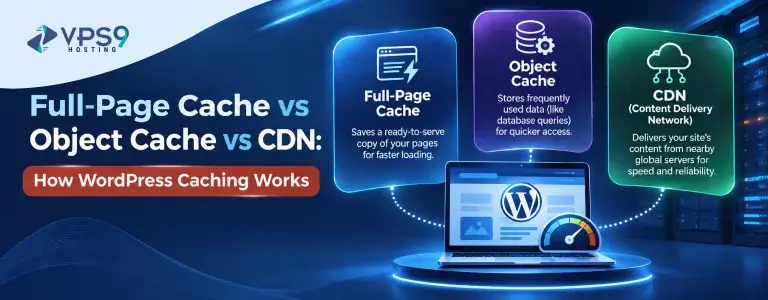
For WordPress websites, caching is one of the most effective ways to reduce loading times and improve the visitor experience. But caching isn’t just one technology. Full-page cache, object cache, and CDN each solve different performance problems.
Understanding how they work makes it easier to choose the right caching setup for your WordPress website.
What Is WordPress Caching?
WordPress caching is the process of temporarily storing frequently requested data so it doesn’t have to be generated or retrieved from the server every time someone visits a page.
Without caching, a typical WordPress request may involve PHP processing, database queries, plugins, themes, and other operations before the final page is delivered to the visitor.
Caching reduces some of this repeated work. Instead of rebuilding the same content again and again, the server can reuse previously generated information.
What Is Full-Page Cache?
Full-page caching stores a complete HTML version of a webpage after it has been generated.
When another visitor requests the same page, the cached HTML can be delivered without WordPress having to process the entire request again.
For example, imagine a blog post that receives hundreds of visits every day. Without full-page caching, WordPress may repeatedly process the same PHP files and database queries to generate that page.
With a full-page cache, the generated version can be reused for many visitors.
This makes full-page cache particularly useful for blogs, business websites, news sites, and other pages where the content doesn’t change with every visitor.
How Full-Page Cache Improves Speed
The biggest advantage of full-page caching is that it reduces the amount of work required to generate a webpage.
Instead of sending every request through WordPress, the server can often return a cached HTML file much faster.
This can reduce server processing time and improve page response times. It can also help the server handle more visitors without requiring the same level of processing for every request.
What Is Object Cache?
Object caching works differently from full-page caching.
Instead of storing an entire webpage, an object cache stores frequently requested pieces of data. This might include database query results, configuration values, or other information generated by WordPress and its plugins.
When WordPress needs the same information again, it can retrieve it from the cache instead of running the same database query repeatedly.
This can be particularly useful for websites with large databases or complex applications.
Object caching is commonly implemented using systems such as Redis or Memcached, depending on the hosting environment and website requirements.
When Is Object Cache Useful?
Object caching becomes more valuable as a WordPress website becomes more dynamic.
An online store, membership website, learning platform, or large content website may perform many database queries during a single page request.
If the same information is requested repeatedly, storing it in memory can reduce unnecessary database activity.
For example, an e-commerce website may repeatedly request product information, categories, pricing data, or other database records. An object cache can keep frequently used information readily available.
This can reduce database workload and improve response times.
What Is a CDN?
A Content Delivery Network, commonly called a CDN, works differently from both full-page and object caching.
A CDN uses a network of servers distributed across different geographic locations. Static website files such as images, CSS, JavaScript, fonts, and sometimes cached HTML can be delivered from a server closer to the visitor.
Without a CDN, a visitor from another country may need to request files directly from your main hosting server.
With a CDN, those files can potentially be served from a nearby edge location.

Full-Page Cache vs Object Cache vs CDN
These three technologies aren’t really competitors. They operate at different levels and can work together.
Full-page cache stores complete webpages and reduces the need to generate the same page repeatedly.
Object cache stores individual pieces of frequently requested data, reducing repeated database operations.
CDN distributes cached website content across multiple locations, allowing visitors to receive static or cached content from a nearby server.
Think of them as different layers of the same performance strategy.
Full-page caching reduces application work. Object caching reduces repeated database work. A CDN improves content delivery between the server and visitors.
How These Caching Methods Work Together
A properly configured WordPress website can use all three caching methods at the same time.
When a visitor requests a page, the full-page cache may serve the page without requiring WordPress to generate it again.
If WordPress needs to process the request, object caching can help reduce repeated database queries and application-level work.
At the same time, a CDN can deliver static files such as images, stylesheets, and JavaScript from an edge location closer to the visitor.
Each layer handles a different part of the request.
This is why combining caching technologies can produce better results than relying on only one caching method.
Does Caching Always Make WordPress Faster?
Caching can significantly improve performance, but it isn’t a magic solution.
Poorly configured caching can create problems. Visitors may see outdated content, logged-in users may experience unexpected behavior, or dynamic sections may not update correctly.
Cache expiration and cache purging are therefore important.
Whenever website content changes, the relevant cached version may need to be refreshed. A good caching setup should know when content needs to be regenerated and when an existing cached version can safely be reused.
Caching should reduce unnecessary work without preventing visitors from receiving current information.
How Caching Affects Server Resources
Caching doesn’t just improve page loading times. It can also reduce pressure on server resources.
Without caching, every request may require PHP processing, database queries, and other server-side operations. When traffic increases, these processes can consume more CPU and RAM.
By serving cached content whenever possible, the server has fewer tasks to perform.
This becomes especially useful during traffic spikes. A website with effective caching may be able to serve more requests without increasing server workload at the same rate.

Which Caching Method Should You Use?
The right approach depends on the type of WordPress website you’re running.
For a simple blog or business website, full-page caching may provide a significant improvement because most pages contain content that doesn’t change frequently.
For websites with complex databases or dynamic functionality, object caching can provide additional benefits by reducing repeated database operations.
For websites with visitors spread across different countries or regions, a CDN can improve the delivery of static files and cached content.
Common WordPress Caching Mistakes
One common mistake is enabling multiple caching systems without understanding how they interact.
Different caching layers can sometimes conflict with one another, particularly when several plugins are trying to control the same caching functions.
Another mistake is caching content that should remain dynamic. Shopping carts, user dashboards, and personalized pages generally require special handling.
It’s also important to test your website after making caching changes. Check both logged-in and logged-out experiences, mobile pages, forms, checkout processes, and recently updated content.
A caching system should make the website faster without breaking important functionality.
Final Thoughts
WordPress caching works by reducing the amount of work required to deliver website content. But different caching technologies solve different problems.
A full-page cache stores complete pages, while an object cache stores frequently requested data and helps reduce database work. A CDN takes caching a step further by distributing content across locations closer to visitors.
When these technologies are configured correctly, they can work together to improve website speed, reduce server workload, and create a smoother experience for visitors.
The important thing isn’t simply enabling every caching option available. It’s understanding how each layer works and using the combination that matches your website’s content, traffic, and functionality.