WordPress powers more than 40% of all websites on the internet. Its flexibility, huge plugin ecosystem, and ease of use make it the most popular content management system in the world. However, popularity also attracts attackers. One of the most common entry points for hackers is the WordPress login page.
Cyber attackers constantly run automated bots attempting to guess usernames and passwords through brute force attacks. If your login page is not secured properly, attackers may gain access to your website, inject malware, steal data, or even completely take control of your server.
Many website owners try to solve this problem by installing heavy security plugins or adding complex firewall rules. However, running your website on a secure hosting environment is equally important for protecting WordPress websites.
The good news is that you can significantly improve secure WordPress login practices without affecting website speed. In this guide, we will explain practical techniques to strengthen WordPress login protection while maintaining optimal performance.
Why WordPress Login Security Is Important
The WordPress login page is the primary entry point to your website’s administration area. Anyone who successfully logs in gains access to the dashboard where they can manage content, install plugins, modify themes, and control the entire website.
Because the login page is publicly accessible, it is also one of the most targeted parts of a WordPress website. Attackers often use automated bots to repeatedly attempt different username and password combinations in order to gain unauthorized access.
The default WordPress login URLs such as /wp-login.php and /wp-admin are well known. This makes it easy for attackers to locate the login page and launch brute-force login attacks against it.
If an attacker successfully accesses the admin panel, they can:
- Install malicious scripts or hidden backdoors
- Inject spam or phishing content into your website
- Redirect visitors to harmful or malicious websites
- Steal sensitive user or customer data
- Completely take control of the website
For businesses, this can lead to SEO penalties, data breaches, downtime, and loss of customer trust.
Strengthening your login page is one of the most important WordPress security tips every website owner should follow to protect their website from unauthorized access.
Change the Default Login URL
One of the simplest and most effective ways to improve WordPress login protection is by changing the default login URL.
Hackers typically target /wp-login.php automatically. If you move the login page to a custom URL, most automated attacks will fail immediately.
Example:
Instead of:
example.com/wp-login.php
Use something like:
example.com/mysecurelogin
Benefits:
- Blocks automated brute force bots
- Reduces login attack attempts
- Improves overall security
Plugins like WPS Hide Login allow you to change the login URL without affecting site performance.
Limit Login Attempts
By default, WordPress allows unlimited login attempts. Attackers can try thousands of password combinations without restriction.
You should implement login attempt limits.
For example:
- Maximum 3–5 login attempts
- Temporary IP block after failures
- Lockout duration (15–60 minutes)
This prevents bots from guessing passwords repeatedly.
Plugins such as Limit Login Attempts Reloaded or server-level rules can handle this effectively.
Because the rule runs only during login attempts, it does not impact page speed.
Enable Two-Factor Authentication (2FA)
Two-Factor Authentication adds an additional layer of protection to the login process.
After entering your password, you must also verify using:
- Mobile authenticator apps
- Email verification codes
- SMS codes
Even if attackers obtain your password, they still cannot access your account without the second verification.
Popular WordPress 2FA plugins include:
- Google Authenticator
- Wordfence Login Security
- WP 2FA
This method significantly improves security while having almost zero impact on website performance.
Use Strong Password Policies
Weak passwords remain one of the biggest security risks.
Common weak passwords include:
- 123456
- password
- admin123
- qwerty
Strong passwords should include:
- Uppercase letters
- Lowercase letters
- Numbers
- Special characters
- Minimum 12 characters
You can enforce strong passwords for users through WordPress security plugins or server policies.
This simple step drastically reduces the chances of brute force success.
Disable Username Enumeration
WordPress allows attackers to discover usernames through several techniques, including author archive URLs.
If attackers know valid usernames, they only need to guess passwords.
To prevent this:
- Disable author enumeration
- Hide usernames from public access
- Use security rules in .htaccess
Blocking username discovery significantly reduces attack success rates.
Use Web Application Firewall (WAF)
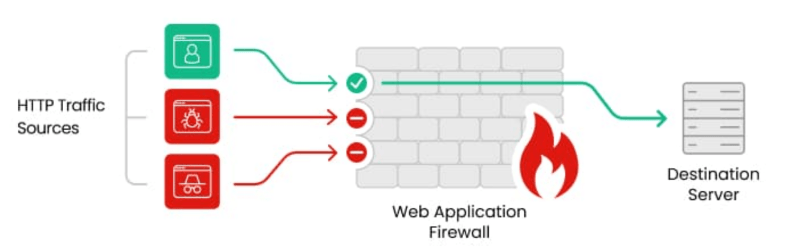
A Web Application Firewall protects websites by filtering malicious traffic before it reaches your server, particularly when running websites on Linux VPS hosting environments.
WAF can block:
- Brute force attacks
- SQL injection
- Malware requests
- Suspicious bots
Popular WAF solutions include:
- Cloudflare
- Sucuri Firewall
- Wordfence Firewall
Cloud-based firewalls are especially useful because they filter attacks before they hit your hosting server, meaning no performance impact on your WordPress site.
Restrict Login Access by IP Address
If you manage a business website with limited administrators, you can restrict login access to specific IP addresses.
Only approved IP addresses will be able to access the login page. This technique is extremely effective against remote attacks.
Disable XML-RPC if Not Needed
XML-RPC is an API used by WordPress for remote communication.
However, attackers often abuse XML-RPC for brute force amplification attacks.
If your website does not require XML-RPC functionality, it is best to disable it.
You can disable it using:
- Security plugins
- Server configuration
- .htaccess rules
This blocks a major attack vector without affecting normal website functionality.
Monitor Login Activity
Monitoring login activity helps detect suspicious behavior early.
You should track:
- Failed login attempts
- IP addresses
- Login times
- User activity
Plugins like WP Activity Log provide detailed insights into login behavior. Monitoring helps you identify attacks before they escalate.

Keep WordPress Updated
Security vulnerabilities are frequently discovered in outdated software.
Always keep updated:
- WordPress core
- Themes
- Plugins
Updates often include security patches that protect against known vulnerabilities.
Running the latest version of WordPress significantly reduces security risks.
Final Thoughts
WordPress login security should never be ignored. Since the login page is the gateway to your entire website, protecting it is essential for maintaining a secure online presence.
Fortunately, improving secure WordPress login practices does not require complicated or performance-heavy solutions. By implementing strategies like changing the login URL, limiting login attempts, enabling two-factor authentication, and using a firewall, you can protect your WordPress website effectively.
A well-secured login system prevents brute force attacks, protects sensitive data, and ensures your website remains safe without slowing down performance.
Following these WordPress security tips will help protect your website from login attacks while ensuring your site continues to perform efficiently without performance loss.